* 목적
Cmake를 3.14.7 버전으로 Update
* 참고
[Ubuntu] CMake 업데이트 하는 방법
nipa에서 지원 받은 서버에 카카오에서 딥러닝 기반으로 개발한 Khaiii 형태소 분석기를 설치하려고 하던 중 (PythonHome) ubuntu@nipa2020-0000:~/somjang-utils/khaiii/build$ cmake .. CMake Error at CMakeLists.txt:1 (cmake_min
somjang.tistory.com
* 방법
1. 설치 파일 다운로드
Download | CMake
Current development distribution Each night binaries are created as part of the testing process. Other than passing all of the tests in CMake, this version of CMake should not be expected to work in a production environment. It is being produced so that us
cmake.org
위 사이트에 접속한 다음 아래에 있는 Older Release 항목에서 kitware 링크 클릭
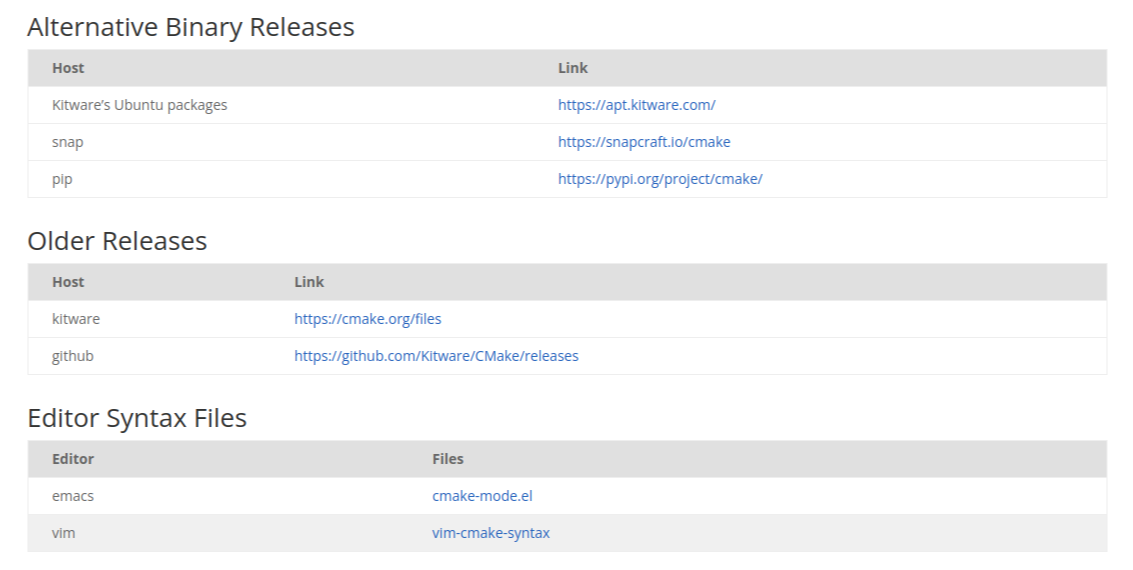
cmake-3.14.7.tar.gz 파일의 링크를 복사한 다음 터미널에 wget 명령어와 함께 입력
wget https://cmake.org/files/v3.14/cmake-3.14.7.tar.gz
2. 압축 해제 및 디렉터리 이동
tar xvf cmake-3.14.7.tar.gz
cd cmake-3.14.7/
3. 설치 진행
./bootstrap
make
sudo make install
4. 버전 확인
cmake --version
'Ubuntu' 카테고리의 다른 글
| Terminator 사용 시 Ctrl+Shift+e 를 활용한 화면 분할이 안되는 경우 / 이모지 비활성화 (0) | 2023.03.25 |
|---|---|
| [Udev] Udev Rules 적용 (0) | 2023.03.06 |
| [Ubuntu] Realsense SDK(realsense-viewer) 설치 (0) | 2023.01.05 |
| [Ubuntu] Laptop에 Wifi가 안 잡힐 때 드라이버 설치하는 방법 (0) | 2023.01.05 |
| [Ubuntu] add-apt-repository 명령어 입력 시 'gi' 에러 (0) | 2022.12.27 |

