* 상황
Github에 push하자 아래 에러가 뜨며 push 실패
remote: Invalid username or token. Password authentication is not supported for Git operations.
fatal: Authentication failed for 'https://github.com/[username]/[repository name].git/'
* 해결방법
- Github에 Push 할 때 계정 비밀번호로는 push가 불가능하며 PAT(Personal access tokens)를 사용해야 함
1. Github에서 PAT 만들기
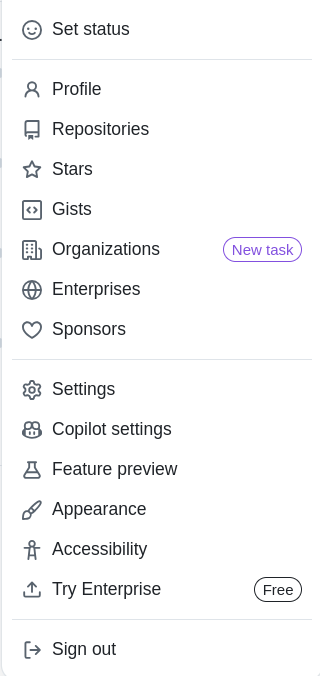
1.1. Github 로그인 후 우측 상단 프로필 아이콘 클릭 - Settings 클릭 - Developer settings 클릭 - Personal access tokens 클릭

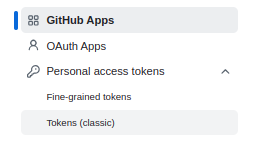
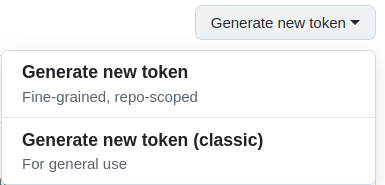
1.2. Generate new token - Generate new token (classic) 선택

1.3. Note, Expiration 입력
- Note는 토큰의 이름
- Expiration은 토큰 만기 기간

1.4. repo 권한 설정 후 Generate token 선택
- repo 체크해야 push 권한 부여 가능
- 입력 후 아래로 내리면 Generate token 버튼 있음

1.5. 출력된 토큰 기록
- 다시는 볼 수 없기 때문에 반드시 기록해둘 것

2. git push 진행
- push 수행 후 password 입력 칸에 계정 비밀번호 대신 방금 생성한 토큰을 붙여넣기하면 push 성공