* 목적 : 유니티 ml-agent와 유니티 내부 오브젝트 연결
1. 환경 세팅 스크립트 작성
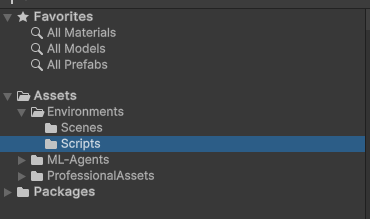
- 프로젝트 뷰에서 Environments 폴더 안에 Scripts 폴더 생성
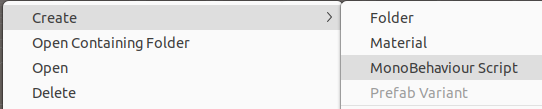
- Scripts 폴더 안에서 마우스 우클릭 - Create - MonoBehaviour Script 클릭하여 파일 생성
- 파일명은 Setting.cs 로 설정
- 이후 아래 코드 그대로 입력
using UnityEngine;
using Unity.MLAgents;

// 환경 초기화 클래스
public class EnvSetting : MonoBehaviour
{
    // 유니티 오브젝트 참조
    public GameObject DroneAgent; // 드론
    public GameObject Goal;       // 목표지점

    // 초기 상태 저장
    Vector3 envInitPos;
    Vector3 droneInitPos;
    Quaternion droneInitRot;

    // ml-agent 환경 파라미터
    EnvironmentParameters m_ResetParams;

    // 유니티에서 위치를 받아오기 위한 변수
    private Transform envTrans;
    private Transform droneTrans;
    private Transform goalTrans;

    // 드론의 물리 상태를 받아오기 위한 변수
    private Rigidbody droneAgentRigidbody;

    // 최초 1번 호출되는 초기화 함수
    // 유니티에서 각 object의 위치를 받아와서 저장한다.
    void Start()
    {
        Debug.Log(m_ResetParams);

        envTrans   = gameObject.transform;
        droneTrans = DroneAgent.transform;
        goalTrans  = Goal.transform;

        envInitPos   = envTrans.position;
        droneInitPos = droneTrans.position;
        droneInitRot = droneTrans.rotation;

        droneAgentRigidbody = DroneAgent.GetComponent<Rigidbody>();
    }

    // 반복해서 호출되는 환경 초기화 함수
    public void AreaSetting()
    {
        droneAgentRigidbody.velocity  = Vector3.zero;
        droneAgentRigidbody.angularVelocity = Vector3.zero;

        droneTrans.SetPositionAndRotation(droneInitPos, droneInitRot);

        goalTrans.position  = envInitPos + new Vector3(Random.Range(-5f, 5f), Random.Range(-5f, 5f), Random.Range(-5f, 5f));

    }
}
2. 드론 에이전트 스크립트 작성
- 1과 동일하게, Scripts 폴더 안에서 마우스 우클릭 - Create - MonoBehaviour Script 클릭하여 파일 생성
- 파일명은 Setting.cs 로 설정
- 이후 아래 코드 그대로 입력
using Unity.MLAgents;
using Unity.MLAgents.Actuators;
using Unity.MLAgents.Sensors;
using UnityEngine;
using PA_DronePack;

// 강화학습 에이전트 클래스
public class DroneAgent : Agent
{
    // 수동조종 클래스
    private PA_DroneController dcoScript;

    public EnvSetting env;
    public GameObject goal;

    // 목표지점의 이전 거리
    float preDist;

    // agent와 목표의 위치
    private Transform agentTrans;
    private Transform goalTrans;

    // 드론의 물리 상태를 받아오기 위한 변수
    private Rigidbody agent_Rigidbody;

    // 최초 1회 실행되는 초기화 함수
    public override void Initialize()
    {
        dcoScript = gameObject.GetComponent<PA_DroneController>();

        agentTrans = gameObject.transform;
        goalTrans = goal.transform;

        agent_Rigidbody = gameObject.GetComponent<Rigidbody>();

        // 매 스탭 전에 행동 결정하도록 함수 호출
        Academy.Instance.AgentPreStep += WaitTimeInference;
    }

    // 강화학습의 observation을 얻는 함수
    // 상대위치, 선속도, 각속도의 총 9차원 변수
    public override void CollectObservations(VectorSensor sensor)
    {
        // 상대 위치, 3차원
        sensor.AddObservation(agentTrans.position - goalTrans.position);

        // 선속도, 3차원
        sensor.AddObservation(agent_Rigidbody.velocity);

        // 각속도, 3차원
        sensor.AddObservation(agent_Rigidbody.angularVelocity);
    }

    // 행동을 처리하는 함수
    public override void OnActionReceived(ActionBuffers actionBuffers)
    {
        // Reward Decay 구현.
        AddReward(-0.01f);

        // agent가 취할 행동
        var actions = actionBuffers.ContinuousActions;

        // x,y,z 속도를 step 함수로 제한
        float moveX = Mathf.Clamp(actions[0], -1, 1f);
        float moveY = Mathf.Clamp(actions[1], -1, 1f);
        float moveZ = Mathf.Clamp(actions[2], -1, 1f);

        // 수동조종 제어 입력
        dcoScript.DriveInput(moveX);
        dcoScript.StrafeInput(moveY);
        dcoScript.LiftInput(moveZ);

        // 골과 현재 위치의 차이 스칼라값
        float distance = Vector3.Magnitude(goalTrans.position - agentTrans.position);

        // 상태에 따라 리워드 결정
        if(distance <= 0.5f) // 도착 시
        {
            AddReward(1f);
            EndEpisode();
        }
        else if(distance > 10f) // 실패(발산) 시
        {
            AddReward(-1f);
            EndEpisode();
        }
        else // 진행 중
        {
            // 이전 거리와 현재 거리의 차이를 계산해서 리워드 적용 후 이전 거리 기억
            float reward = preDist - distance;
            AddReward(reward);
            preDist = distance;
        }
    }

    // 환경 초기화하는 함수
    public override void OnEpisodeBegin()
    {
        env.AreaSetting();

        preDist = Vector3.Magnitude(goalTrans.position - agentTrans.position);
    }

    private void OnDestroy()
    {
        if (Academy.IsInitialized)
        {
            Academy.Instance.AgentPreStep -= WaitTimeInference;
        }

    }

    // 수동 조종 함수, 디버깅용
    public override void Heuristic(in ActionBuffers actionsOut)
    {
        var continuousActionsOut = actionsOut.ContinuousActions;

        continuousActionsOut[0] = Input.GetAxis("Vertical");
        continuousActionsOut[1] = Input.GetAxis("Horizontal");
        continuousActionsOut[2] = Input.GetAxis("Mouse ScrollWheel");
    }

    // 통신이 안 될 때를 처리하기 위한 변수와 함수
    public float DecisionWaitingTime = 5f;
    float m_currentTime = 0f;

    public void WaitTimeInference(int action)
    {
        if(Academy.Instance.IsCommunicatorOn)
        {
            RequestDecision();
        }
        else
        {
            if(m_currentTime >= DecisionWaitingTime)
            {
                m_currentTime = 0f;
                RequestDecision();
            }
            else
            {
                m_currentTime +=Time.fixedDeltaTime;
            }
       }
    }

}
3. 스크립트와 agent 연결
3.1 Setting 스크립트 추가
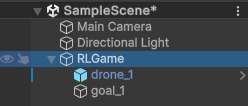
- 좌측 하이러키 창에서 RLGame 오브젝트(드론과 장애물이 포함된 오브젝트) 선택
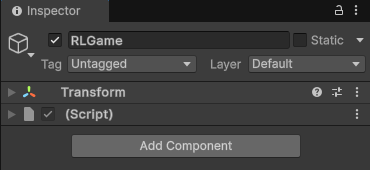
- 우측 인스펙터 창에서 Add Component 클릭
- Setting 검색후 검색된 Setting 스크립트를 선택하여 추가
- 추가된 컴포넌트에서 Drone Agent 우측에 잇는 작은 마크를 클릭하여 Select Game Object 창 열기
- drone_1 선택하여 오브젝트 연결
- goal에 대해서도 동일하게 반복
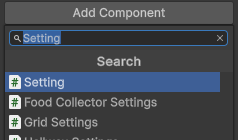

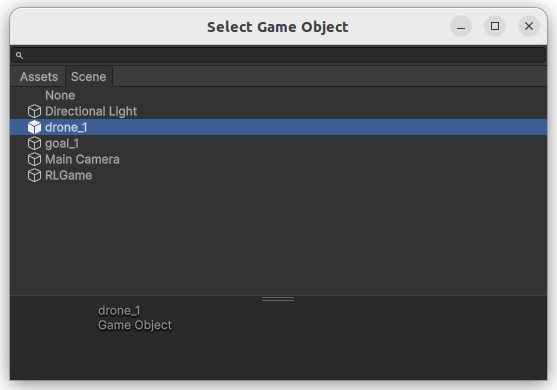
3.2 droneagent 스크립트 추가
- 좌측 하이러키 창에서 drone_1 선택
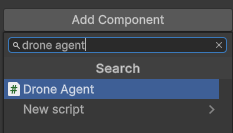
- 우측 인스펙터 창에서 Add Component 클릭
- drone agent 검색후 검색된 Drone Agent 스크립트를 선택하여 추가
- Drone Agent 스크립트에서 3.1과 동일하게 Env에는 RLGame, Goal에는 goal_1 오브젝트 연결
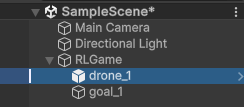
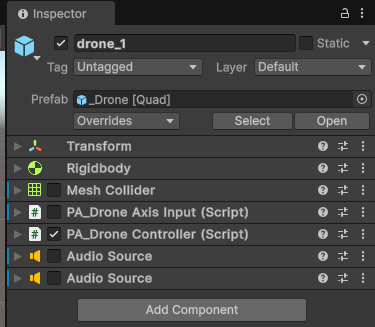
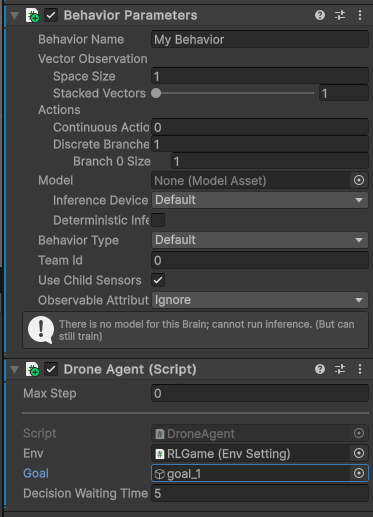
3.3 Behavior parameter 컴포넌트 수정
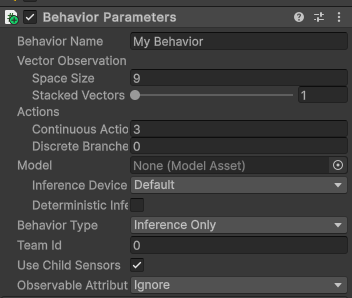
- Vector Observation : 9로 수정 (상대위치, 속도, 각속도)
- Actions : Continuous Action : 3, Discrete Branches : 0으로 수정 (x,y,z축 속도)
- Behavior Type : Default로 변경 (기본이 default일 경우 변경할 필요 없음)
4. 유니티 환경 빌드
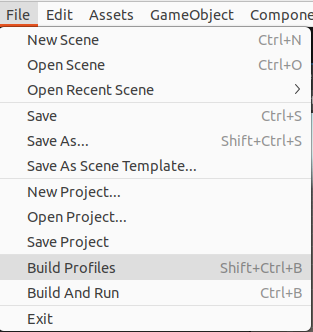
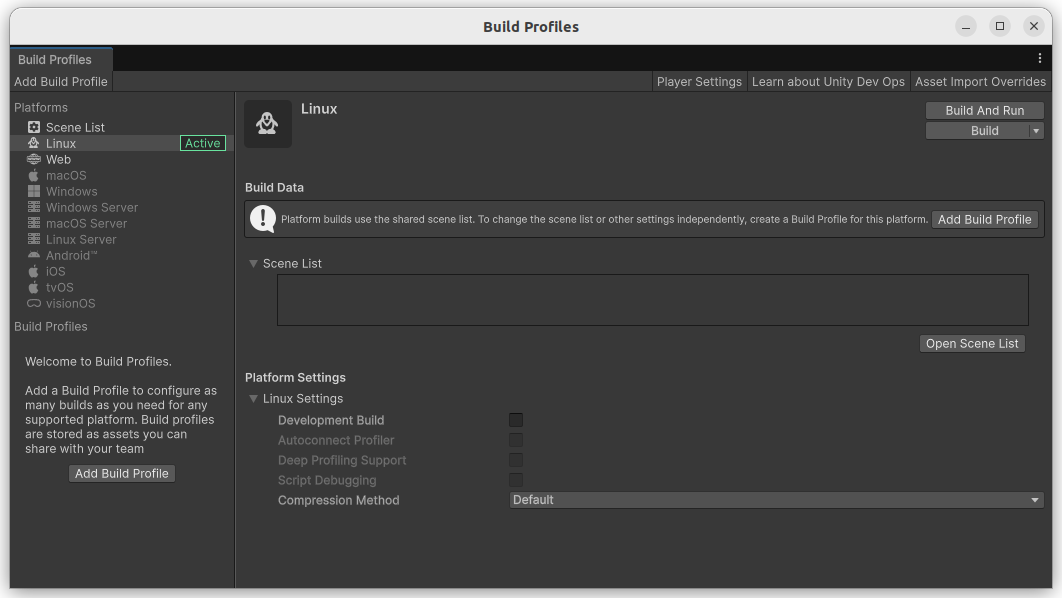
- 상단 메뉴바에서 File - Build Profiles 클릭
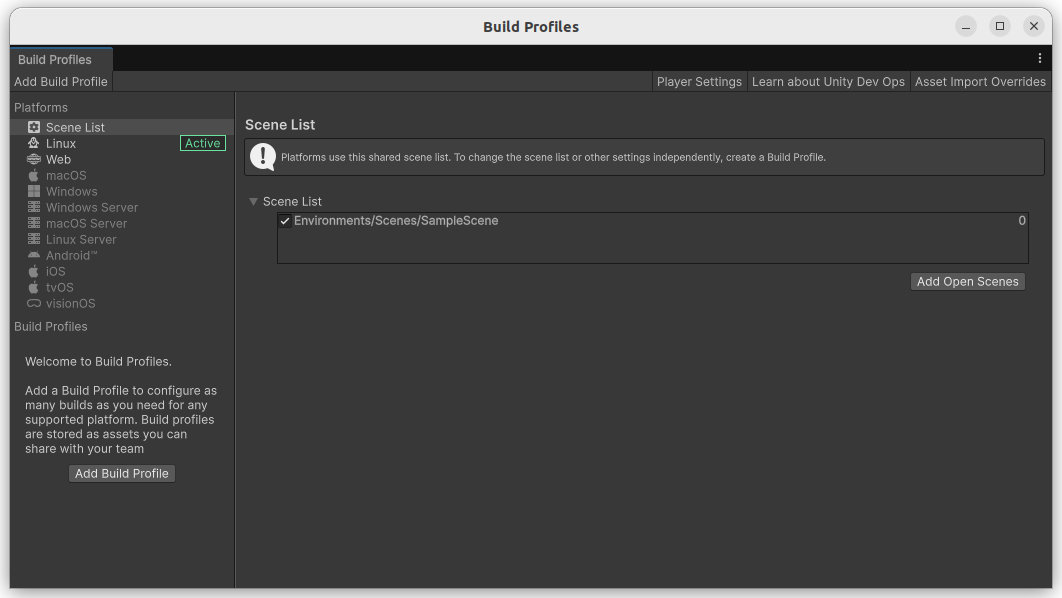
- Build Profiles에서 Open Scene List 클릭
- Scene List에서 Add Open Scenes 선택
- 좌측 Platforms 창에서 Linux 선택 후 Build 클릭 후 경로 설정하면 빌드 완료

'강화학습' 카테고리의 다른 글
| [Unity] ml-agent 설정 시 화면 설정 (0) | 2025.11.22 |
|---|---|
| [Unity] The type or namespace name 'NewtonSoft' does not exist in the namespace 'UnityEditor' 에러 해결 (1) | 2025.07.27 |
| [Unity] The type or namespace name 'Recorder' does not exist in the namespace 'UnityEditor' 에러 해결 (0) | 2025.07.27 |
| [유니티] 강화학습 환경 구축을 위한 드론 환경 세팅 (1) - 유니티 세팅 (3) | 2025.07.13 |
| [유니티] ml-agent 설치 (0) | 2025.07.13 |


